
The standard GPU utilization metric doesn't measure what it claims to. Here's what
accurate measurement actually looks like, and an open-source tool to bring it to every AI deployment.
April 20, 2026
15 min read
TL;DR
The standard GPU utilization metric, the one reported by nvidia-smi, nvtop, rocm-smi, Weights & Biases, Amazon CloudWatch, Google Cloud Monitoring, and Azure Monitor, does not measure how hard your GPU is actually working. It only tells you whether the GPU is doing anything at all. Real compute throughput can be as low as 1% while dashboards read 100%. That single misleading number drives enormous amounts of wasted spend, wasted energy, and unnecessary hardware purchases across the AI industry.
Systalyze is open-sourcing Utilyze, a free, production-ready monitoring and debugging tool that accurately shows how efficiently your GPUs are actually doing useful work, and how close you are to the realistic maximum for your specific workload. Utilyze runs alongside any AI workload in real time with negligible overhead. In production deployments, Utilyze revealed orders-of-magnitude performance headroom in settings that standard tools declared fully saturated.
This has real consequences. New hardware takes months to acquire, energy costs are climbing alongside AI's surging electricity demand, and every dollar spent on unnecessary GPUs is a dollar not spent on the models themselves. Every percentage point of real throughput recovered from existing hardware is money not spent, a server rack not built, and a kilowatt-hour not consumed. Accurate measurement is the foundation, and Systalyze is the optimization platform built on top of it, enabling you to close the gap between where your deployment is and where it could be.
Give Utilyze a try today
"The gap isn't awareness — engineers who write CUDA kernels know what accurate utilization looks like. The gap is tooling. There has never been a way to see true GPU efficiency continuously, in production, without slowing down the workload."
— Manya Ghobadi, MIT Professor & CEO, Systalyze
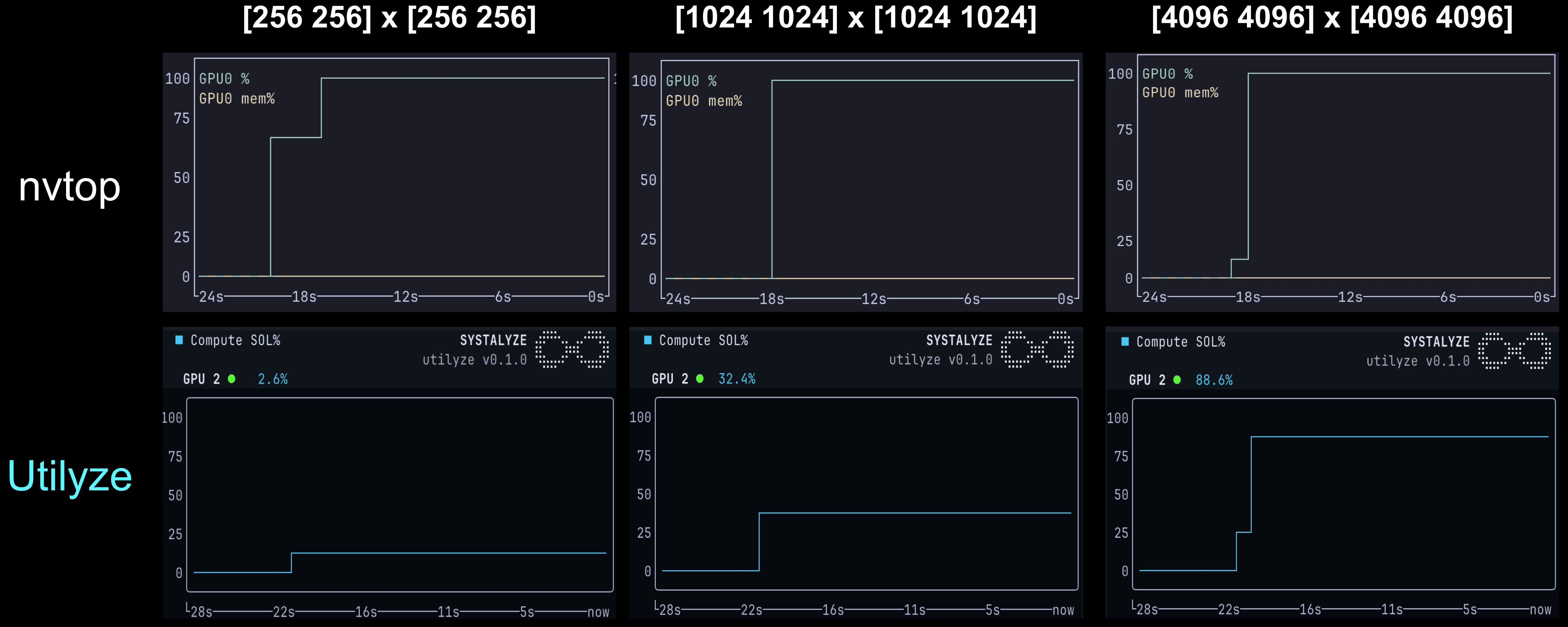
nvtop (top row) reads 100% on all three workloads regardless of the size of the matrix multiplications. Utilyze (bottom row) tracks actual compute throughput, showing dramatic utilization variation for different matrix sizes.
As shown in the above figure, nvtop is invariant to workload intensity: all three matrix multiplication sizes show 100% in nvtop (top row: cyan line pinned at the ceiling). Utilyze (bottom row) shows compute throughput scaling with matrix size, from 2.6% at N=256, 32% at N=1024 and 88% at N=4096.
To validate the correctness of Utilyze, let’s calculate the true compute utilization directly: a matrix multiplication of two N×N matrices at TF32 precision performs 2·N³ floating-point operations. We scale the H200 peak TF32 rate of 494.5 TFLOPS by the GPU's clock speed and calculate utilization. At N=256, 2·256³ ≈ 0.034 GFLOPs × 155,349 iterations/sec = 5.2 TFLOPS, or 1% utilization. The same calculation yields 32% utilization at N=1024 and 86% at N=4096. In comparison, the theoretical ground truth numbers are within 2% of the numbers Utilyze reported.
While this direct calculation is tractable for a simple compute operation like direct matrix multiplication, it becomes intractable for real-world AI workloads. Modern training, fine-tuning, and inference pipelines consist of heterogeneous operators (attention, normalization, communication, sparsity, control flow), dynamic shapes, and complex scheduling effects across the GPU. In such settings, deriving true utilization analytically from first principles is not practical. What is needed instead is a method that measures utilization directly at the hardware level.
Utilyze provides exactly this capability: direct measurement of true compute utilization via GPU hardware performance counters. Utilyze arrives at nearly identical values (within 2%) from the other direction. Instead of deriving utilization from FLOP counts, it samples hardware counters on the GPU directly. The two methods agree because they measure the same physical thing from different angles: arithmetic work done against arithmetic capacity available. This cross-validation confirms Utilyze’s hardware-counter approach is accurate. No other tool today delivers this level of accuracy in real time without incurring meaningful overhead.
“Cloud providers and hardware vendors surface this same misleading metric on their dashboards. When that number reads 100%, the natural conclusion is that you need more hardware. The incentives to correct this misimpression are, to put it diplomatically, complicated.”
— Manya Ghobadi, MIT Professor & CEO, Systalyze
DCGM-based Counters Aren’t Much Better
Prior articles have pointed out this gap and suggested alternative metrics through NVIDIA's Data Center GPU Manager (DCGM), a toolkit that exposes richer GPU counters than nvidia-smi (see here and here).
The most common proxy to GPU utilization is DCGM’s “SM Active.” It measures the ratio of SMs with at least one warp scheduled over the total number of SMs. This metric is an improvement over nvdia-smi, because at least it considers some compute activity inside the GPU rather than treating the whole chip as a single on/off switch. But SM active, and other DCGM metrics, have the same shape of problem one level down: a warp being resident on an SM does not mean that SM is doing arithmetic. The warp could be moving data, waiting for data to arrive from memory, or running bookkeeping instructions the entire time, and SM Active would still read 100%. Utilyze is specifically built to answer the true GPU utilization question: what fraction of peak arithmetic throughput is the GPU actually delivering? No off-the-shelf tool, including DCGM, provides this continuously in production.
To see this in practice, we ran a memory-bound workload on an H200, similar in shape to a decode-heavy LLM inference step, with nvtop, DCGM, and Utilyze. Under this workload the actual arithmetic throughput is around 6% of the ceiling
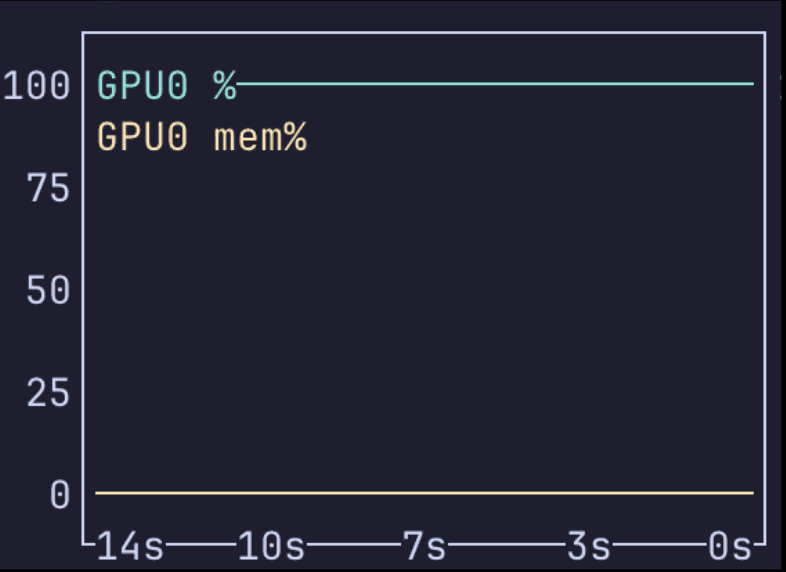
nvtop: 100%
ground truth: 6%
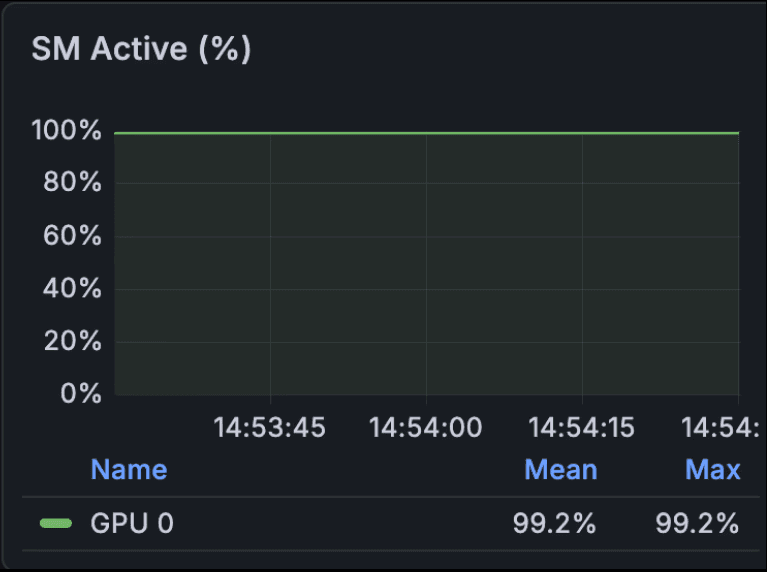
SM Active (DCGM):99%
ground truth: 6%
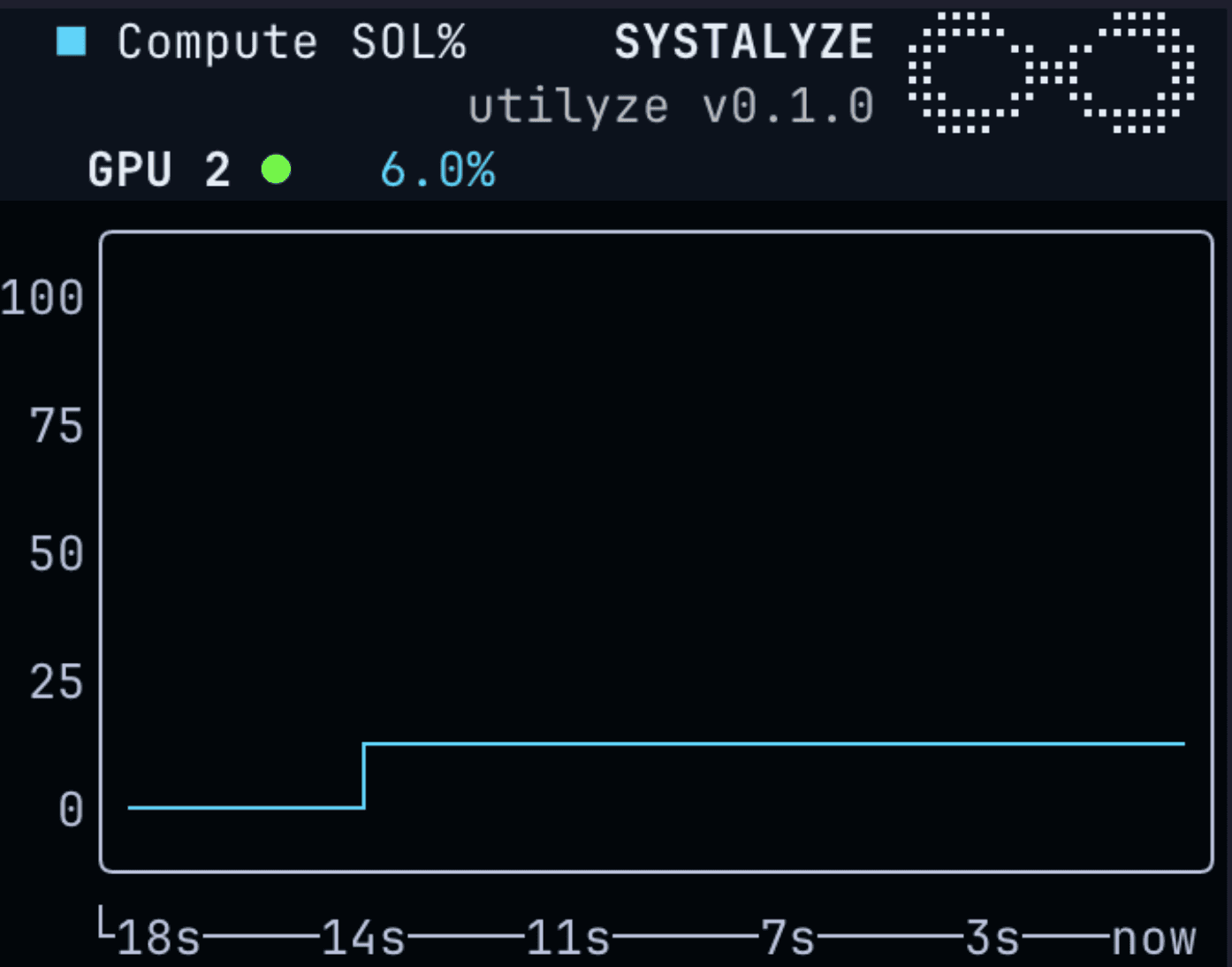
Utilyze: 6%
ground truth: 6%
Only Utilyze gets it right. nvtop is wrong for the reason we already covered. SM Active reports a whopping 99% utilization. The SMs really do have warps resident the whole time, but those warps are waiting on memory rather than doing math, and SM Active cannot distinguish between a warp that is computing and a warp that is sitting idle waiting for data. Relying on SM active to monitor the GPU utilization gives the illusion that the GPU is fully saturated while it is actually just sitting idle.
DCGM reports other metrics, such as SM issue (how often are instructions being issued), SM occupancy (how full are the SMs of warps), and tensor core throughput. None of these metrics, independently or combined, show the full picture that Utilyze provides.
Introducing Utilyze, Open-Sourced by Systalyze
We built Utilyze as an open-source, GPU monitoring tool to report true GPU compute and GPU memory bandwidth utilization as a percentage of the hardware’s theoretical limit. Beyond raw utilization, Utilyze estimates the portion of the theoretical limit that is practically attainable under the current hardware, software stack, and AI workload as well. Utilyze operates in real time with near-zero overhead, making it suitable for production environments where continuous observability is required without perturbing performance. At Systalyze, we use it to monitor, benchmark, and validate our performance optimization techniques and we think everyone should use it.
Give Utilyze a try today
Before describing how Utilyze works, let’s unpack why accurate GPU utilization is a technically difficult measurement problem. GPUs have two fundamentally different types of compute resources: CUDA cores for general floating-point math, and Tensor Cores that perform matrix multiplications. They also have multiple levels of memory: HBM (high bandwidth memory) sitting off-chip, L2 cache, shared memory inside each SM, and registers local to each thread. Each of these resources can be a bottleneck independently. A workload can be using its Tensor Cores at full capacity while memory bandwidth sits nearly idle, or vice versa. A single percentage cannot represent this two-dimensional reality.
As a result, every AI operation on a GPU is constrained by two physical limits: how fast the math units can execute arithmetic (compute throughput), and how fast data can move between memory and the math units (memory bandwidth). Every kernel hits one of these limits first, and that determines its maximum possible performance.
This brings us to the framework that actually captures GPU utilization accurately: the Speed-of-Light (SOL) model. This model is a performance framework that measures how close a kernel gets to the GPU's theoretical hardware ceiling, reporting two key numbers: Compute SOL % (= achieved FLOPs ÷ peak FLOPs) and Memory SOL % (= achieved bandwidth ÷ peak bandwidth). It derives from the roofline model, where every kernel is bounded by either compute or memory, and the higher of the two SOL percentages identifies the binding constraint.
Utilyze provides exactly that, with two headline numbers: Compute SOL % and Memory SOL %. Both are shown live. The numerator comes from direct measurement of each compute engine (e.g., Tensor Cores, FP32/FP64/INT32 pipelines) and each memory subsystem (e.g., HBM bandwidth, L2, L1) where NVIDIA exposes each as a percentage of that hardware unit's theoretical maximum. The denominator is the SOL itself, the hardware peak. Together, these give you an accurate, live picture of GPU utilization that no other tool provides. If the compute number is dominant, your workload is compute-bound. If the memory number is dominant, you're memory-bound, and optimizations should target data movement first.
But it doesn’t end here. Here's something important that raw SOL % doesn't tell you on its own: 100% is not a realistic target.
The theoretical hardware peak of 2,000 TFLOPS of compute, 3.4 TB/s of memory bandwidth on an H100, is a physical limit that no real AI workload can reach. Kernel launches have overhead. Data moves between levels of the memory hierarchy. Thread synchronization takes cycles. In multi-GPU setups, communication between GPUs consumes time that could otherwise be spent on computation. For Mixture-of-Experts models, routing tokens to different experts creates irregular memory access patterns that reduce effective throughput. None of these are signs of poor optimization, they're structural properties of real deployments.
Every deployment has a natural ceiling below 100% that reflects the specific combination of model architecture, hardware, parallelism strategy, and batch size. We call this ceiling the Attainable Compute SOL %, hereafter referred to as Attainable SOL %. The gap between your current SOL % and the Attainable SOL % is your optimization budget. The gap between the Attainable SOL % and 100% is the physics of your deployment; you can't close it by tuning.
For instance, if you're running a 120B-parameter inference setup at 30% Compute SOL % and the Attainable SOL % for that model on that hardware is 35%, you're close to the limit. If the Attainable SOL % is 65% and you're at 30%, you have 35 percentage points of recoverable performance, and the right move is optimization, not procurement.
Why Is Utilyze Different?
Performance engineers often rely on two main tools to debug performance problems of AI workloads. First is Nsight Compute (ncu), a kernel-level profiler that reports detailed compute and memory throughput metrics, such as what fraction of the Tensor Core's theoretical throughput was actually achieved, what fraction of the memory bus was saturated, and where the bottleneck lies. The second tool is Nsight Systems (nsys), a timeline tool that records when kernels ran and how they interacted.
Both tools are built for offline analysis rather than a real-time dashboard. ncu gets its detail by "replaying" each kernel, running it many times with different counters selected, then stitching the results together. The result is valuable, but its overhead causes the workloads to run 10× to 100× slower than normal, which rules it out for live traffic. nsys avoids the slowdown but doesn't report throughput metrics at all, it answers "what happened" rather than "how efficiently."
The practical consequence: seasoned engineers who regularly reach for ncu (or its AMD equivalent, Omniperf) are using them for offline, per-kernel debugging and not to watch live traffic.
To address this challenge, Utilyze cycles through GPU performance counters across time windows using NVIDIA's Nsight Perf SDK. Rather than replaying kernels, Utilyze takes a rolling sample across multiple windows and aggregates the result. As a result, the overhead is negligible and the measurement is continuous. You can run Utilyze alongside any production AI workload and get meaningful data in real time.
Benchmarking Utilyze
The following are a few examples demonstrating how to leverage Utilyze to identify performance bottlenecks in real AI workloads.
Case 1: Prefill-heavy LLM inference
Let’s start with an inference workload: a Llama-3.1-8B, model running with vLLM 0.19 on 2xH200 GPUs. We first use a prefill-heavy workload with Input Sequence Length (ISL) of 8192, Output Sequence Length (OSL) of 64, and concurrency of 20. The following figure shows the output of Utilyze as this workload runs.
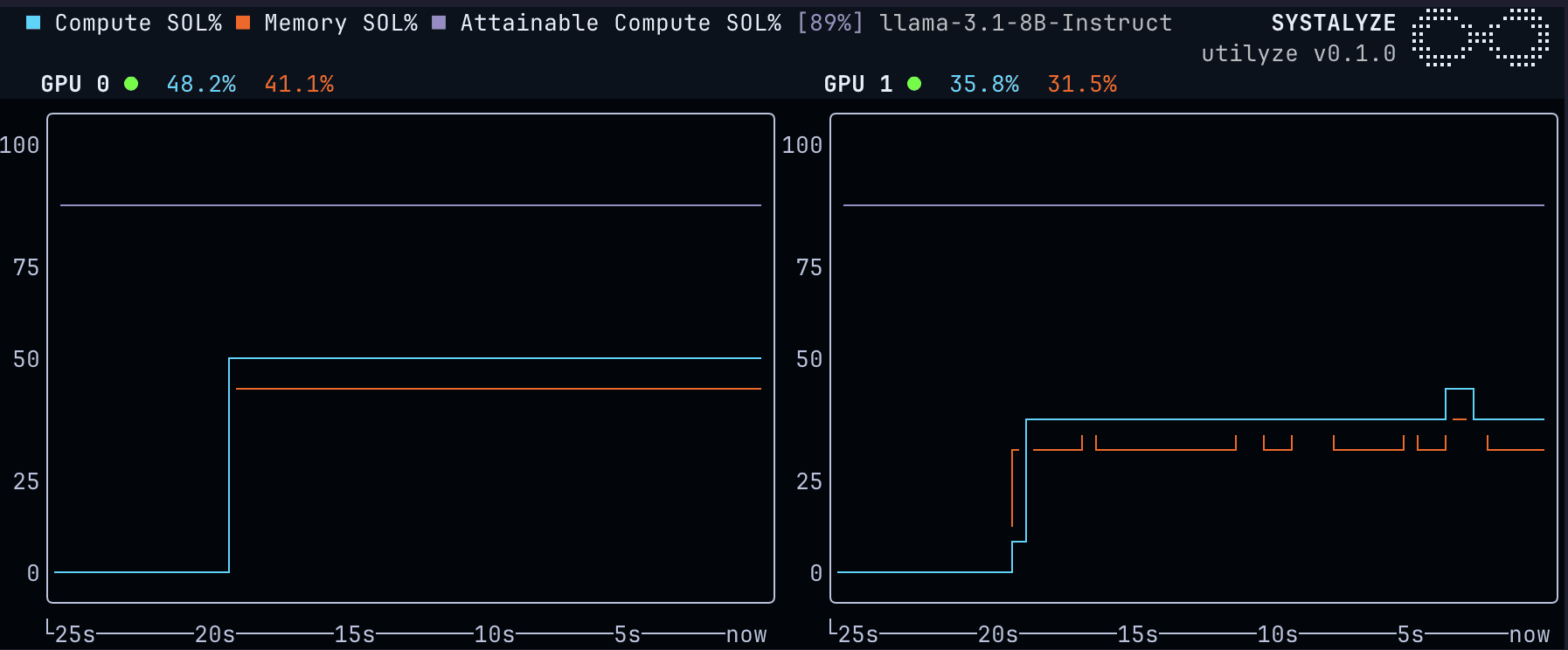
Utilyze shows that these GPUs are running at around 45% of their theoretical maximum, according to the Compute SOL % metric for this workload. Note that the Memory SOL % metric is lower than the Compute SOL, indicating that this workload and model is not memory-bandwidth bound; rather it is compute-bound. This is useful when comparing to decode-heavy inference workloads, which are often memory-bound. Utilyze has estimated that the upper bound compute utilization, or Attainable SOL %, is 89%. This number is model, GPU, and workload specific – there are inherent properties of certain models and workloads that cause their Attainable SOL % to vary. The difference between Attainable SOL % and Compute SOL % indicates that the GPU is currently underutilized.
Let’s now compare this to nvtop:
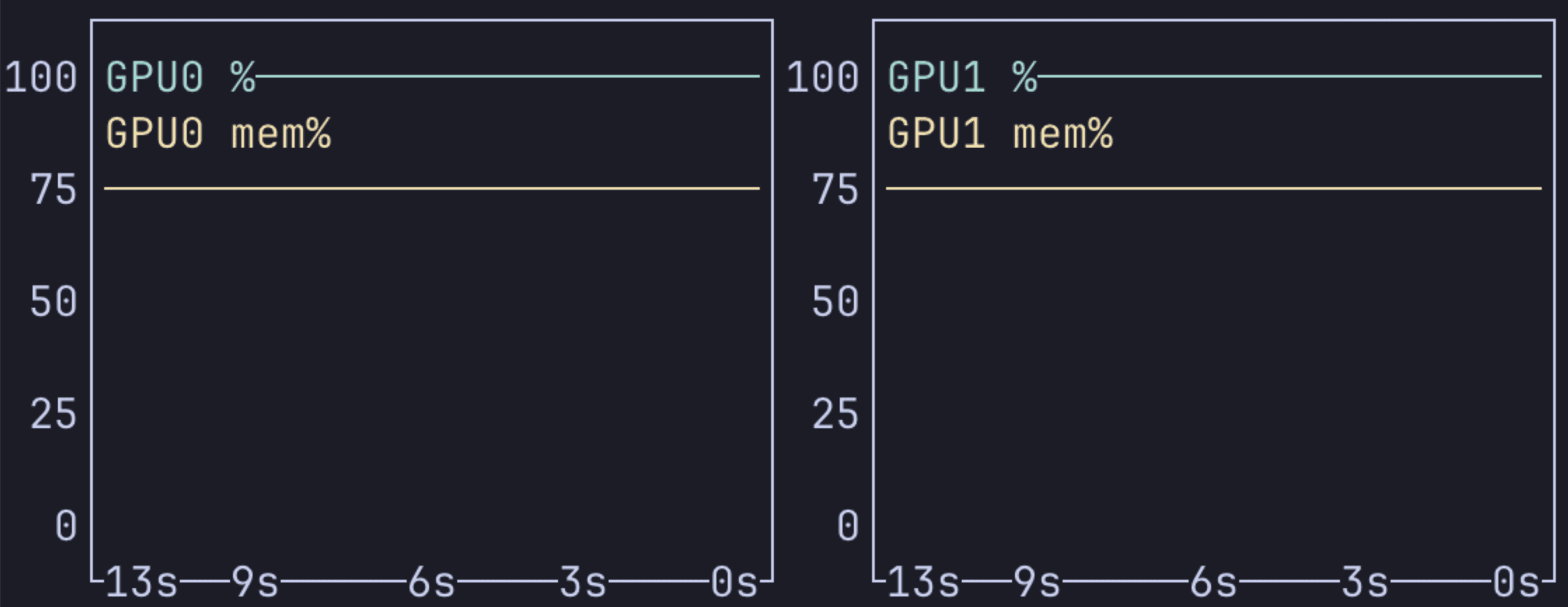
nvtop's utilization sits at 100% the entire time. Reading this metric as a measure of GPU utilization would provide misleading information that the GPU is fully utilized and no optimization can be done. Utilyze tells us this isn’t the case.
Now let’s apply Systalyze’s optimizations to this model and run the same benchmark:
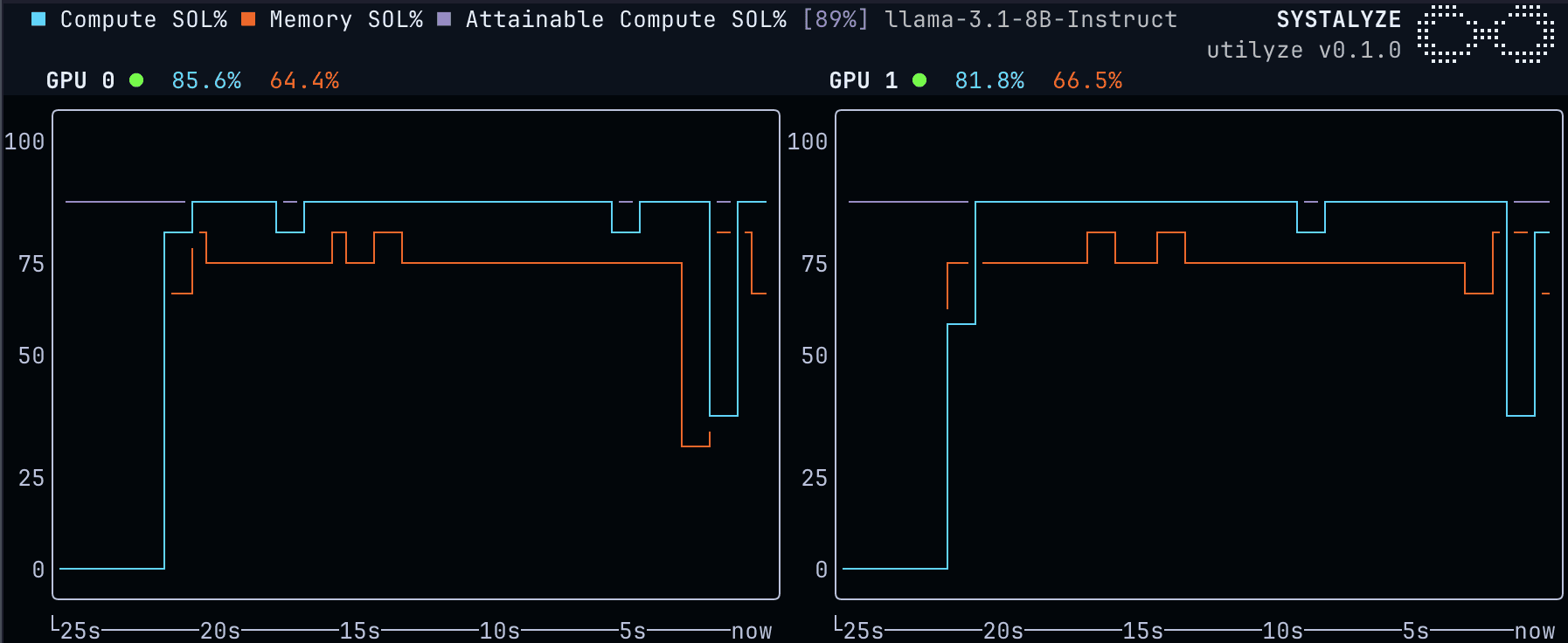
The figure above shows that the new Compute SOL % line reaches the Attainable SOL %, meaning we have pushed the GPU nearly as far as possible for this model. The throughput numbers match this increase in utilization. The total token throughput before Systalyze’s optimization is 52,298 tokens/s, with the optimizations reaching 73,903 tokens/s, a 40% increase.
Case 2: Decode LLM inference
Interpreting Utilyze’s GPU utilization numbers in decode-heavy inference requires a greater understanding of the underlying mechanics. We’ll walk through a number of different scenarios and explain how Utilyze helps understand what’s actually happening inside the GPU.
Let’s start with the same model, unoptimized, with a decode-heavy workload (ISL = 1024, OSL = 4096, concurrency = 2):
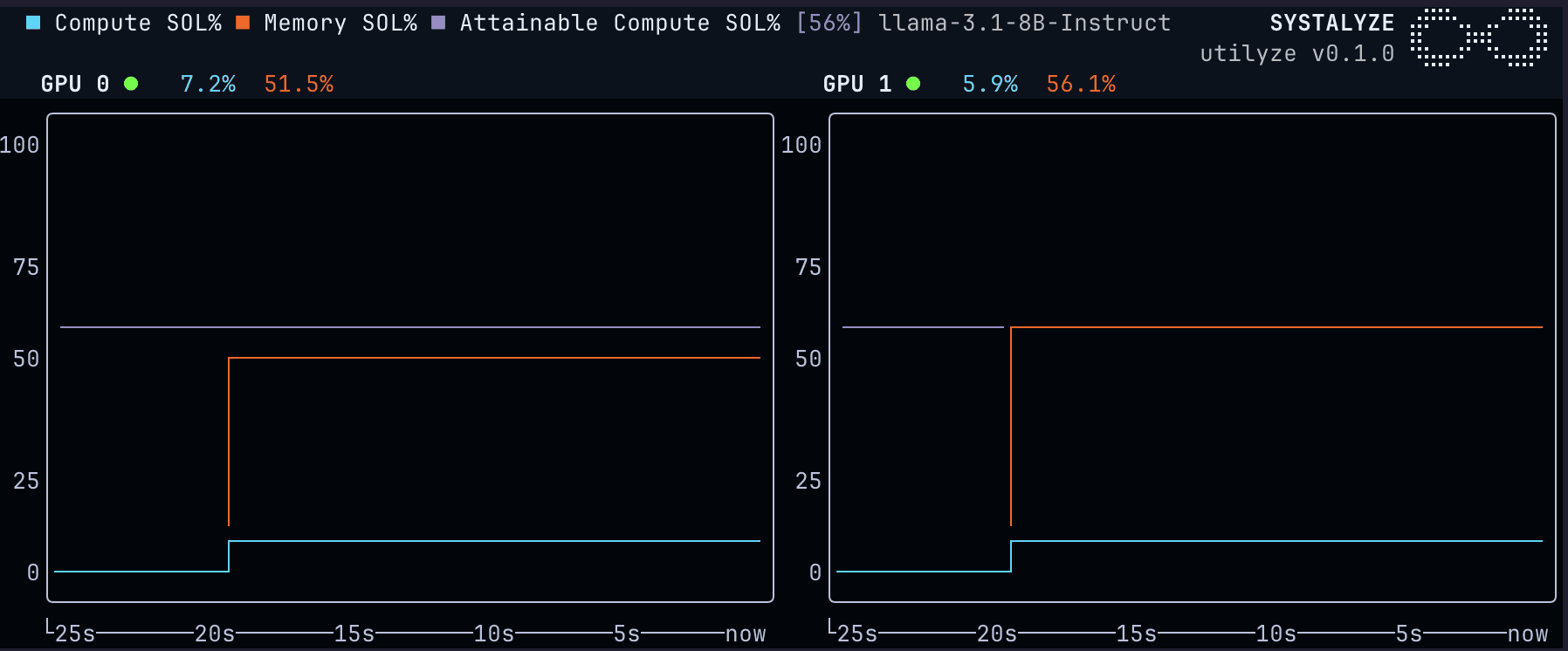
The above figure shows that the Memory SOL % is significantly higher than the Compute SOL %, which indicates that this workload is memory-bandwidth bound. Decode-heavy LLM workloads are often memory-bandwidth bound, not compute bound (see here) . This is because for each batch of tokens decoded, the entire model weights and the KV cache of each user’s queries need to be moved from HBM to the compute units of the GPU.
Let’s run the same workload, but with a higher concurrency (ISL = 1024, OSL = 4096, concurrency = 32):
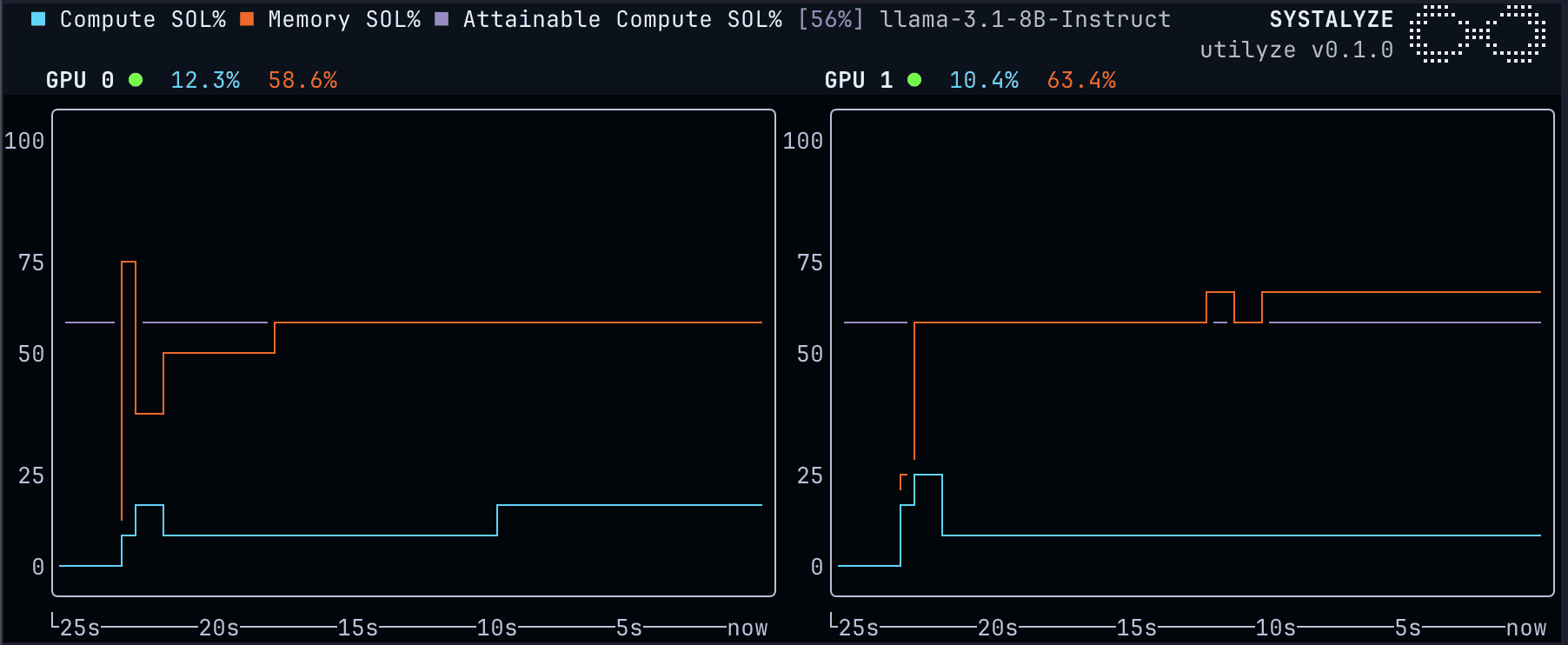
At higher concurrency, both the Memory SOL % and Compute SOL % report higher values. The Compute SOL % is higher due to the larger batch size: for each batch of tokens, we only have to read the model weights from memory once, which results in more compute work per batch. The Memory SOL % reports higher values because the GPUs are reading more information from the KV cache in total. The Memory SOL % increases over the course of the benchmark since later tokens have a larger KV cache to read from memory when performing a decode step.
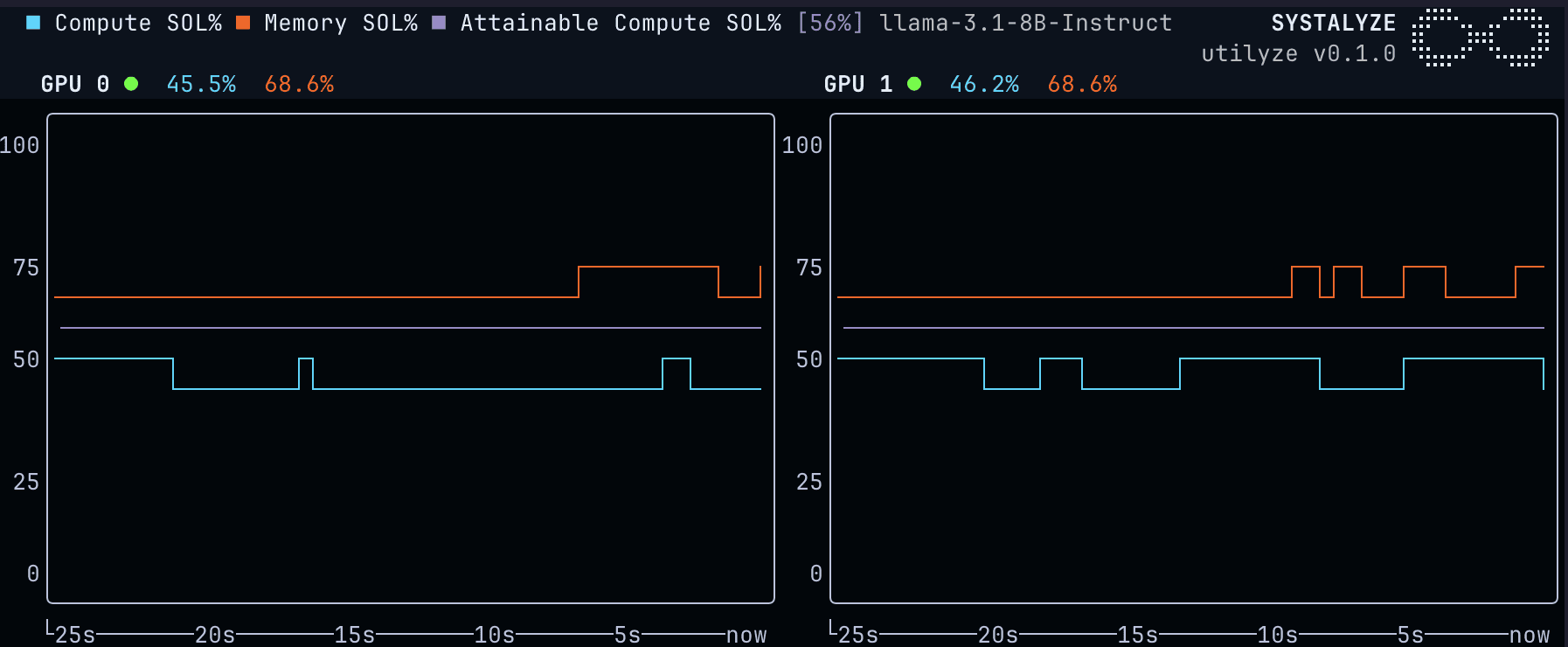
When we try to batch as much as possible, setting the concurrency to 1024, our Compute SOL % value approaches 46% and we nearly reach Attainable SOL %:
Case 3: LLM Fine-Tuning
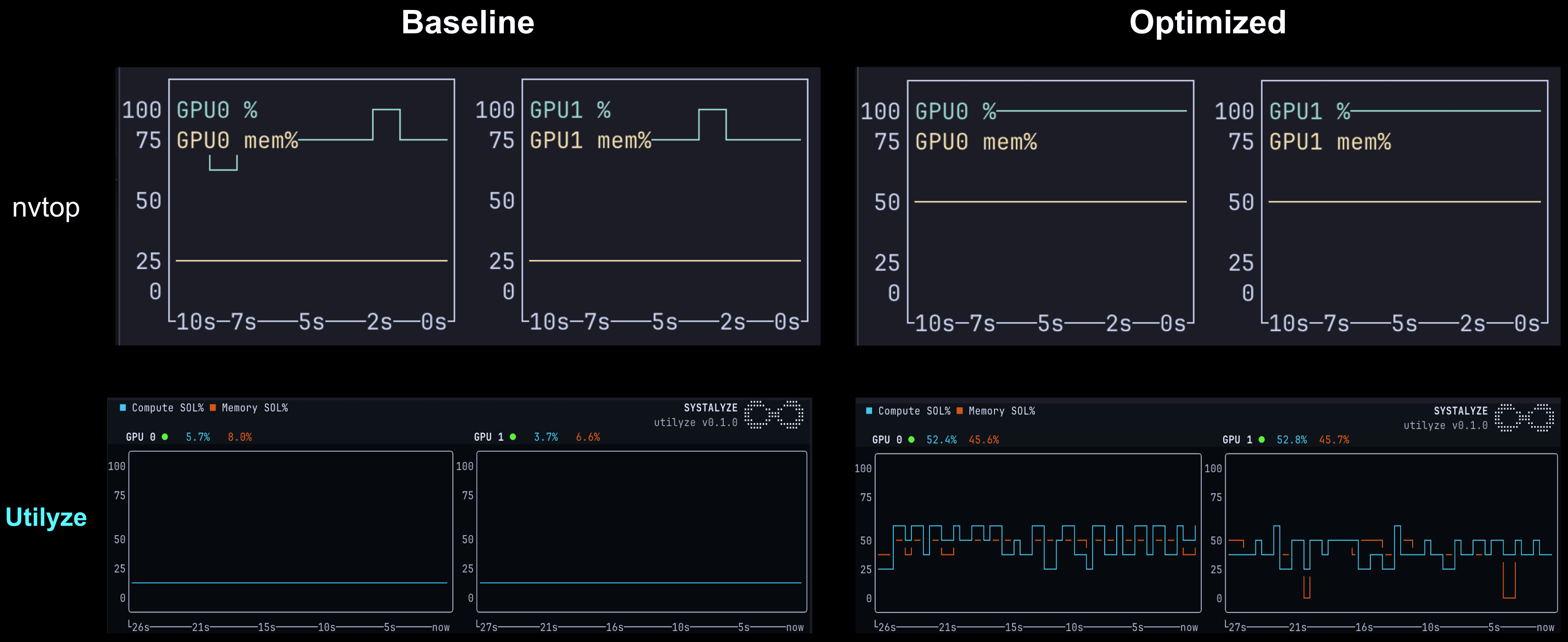
Let us now fine-tune our Llama-3.1-8B model with LoRA on two NVIDIA H200 GPUs, using default framework settings. LoRA (Low-Rank Adaptation) is a widely used parameter-efficient fine-tuning technique: rather than updating all model weights, it inserts small trainable adapter matrices at each transformer layer while keeping the base model frozen. The training loop alternates between a forward pass through the frozen model, a backward pass to compute gradients for the adapter layers, and an optimizer step to update only the adapter parameters. Utilyze reports a Compute SOL % of 1–7% throughout substantially below the hardware’s theoretical maximum, while nvidia-smi, as in every case gives an overestimation of 80-100%.
The low Compute SOL % is characteristic of LoRA fine-tuning under default settings, and understanding why requires looking at the arithmetic intensity of the operations involved. The dominant cost during the forward and backward passes is streaming the frozen base model weights through HBM on every training step. Those reads are large and sequential, which is efficient for memory bandwidth, but they produce relatively little arithmetic work per byte moved, placing this workload firmly in the memory-bound regime. Meanwhile, the LoRA adapter layers themselves are small: with a typical rank of 8 to 64, the matrix multiplications they introduce have problem sizes far too small to saturate the Tensor Cores. The result is that the GPU is dispatching kernels continuously throughout training, but the Tensor Cores are underutilized for much of that time, waiting on data rather than performing arithmetic. This is the same fundamental pattern seen in the memory-bound decode-heavy inference case: the GPU appears saturated from the outside, while the compute units sit largely idle inside.
The figure below shows the Utilyze output for this workload before and after applying Systalyze’s optimizations. In the baseline run, Compute SOL % sits steadily between 1% and 7%. Applying Systalyze’s optimizations brings the Compute SOL % to 40–55%. This represents a 6–8× improvement in actual GPU compute throughput, reflected directly in training step time. The underlying compute capacity was always there. What was missing was the measurement to make it visible, and the tooling to act on it.
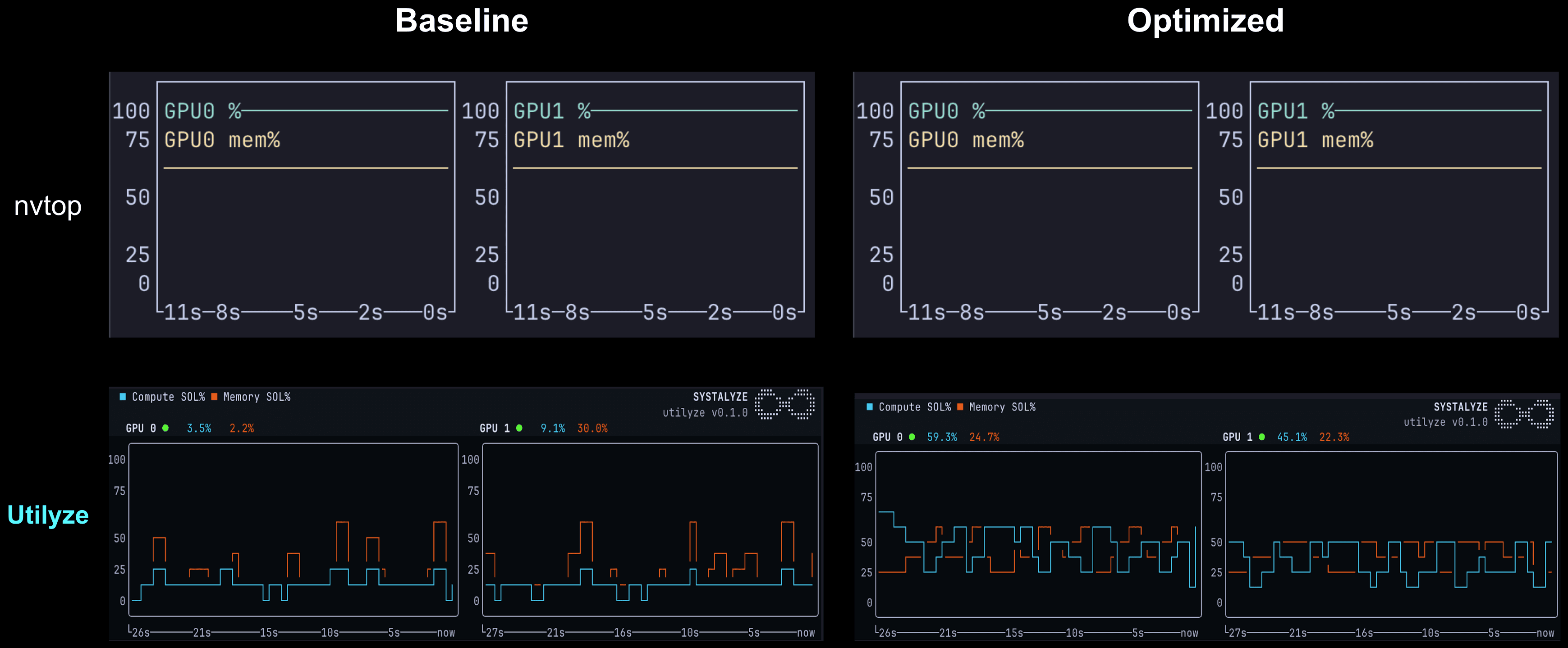
For a harder case, consider a full finetune of gpt-oss-20b on 4 NVIDIA H200 GPUs. gpt-oss-20b is a Mixture-of-Experts model, of the 20B total parameters, only 3.6 billion parameters activate per token. The model doesn't fit on one H200, so the training framework shards parameters, gradients, and optimizer states across all four GPUs with communication every step. Utilyze reports 3–15% Compute SOL % throughout for the baseline run. nvidia-smi reads 100% (shown in the figure below). The Compute SOL % values are characteristic of MoE models: Tensor Cores want large uniform matmuls, and MoE gives them the small uneven chunks, one per active expert, with routing and token-shuffling that doesn't fully utilize the GPU. With Systalyze’s optimizations, utilization is pushed to 30-60%, reflecting a better design for MoE training. The workload shifts from being fully memory-bandwidth bound to compute-bound. The MoE sparsity trades off GPU utilization for smaller per-token activations and lower training FLOPs per token, so the lower SOL % is partly inherent to the architecture, not just a tuning problem.
From Measurement to Performance: Systalyze
Utilyze shows you where you are. Systalyze closes the gap. Our platform uses the same SOL measurement infrastructure to automatically identify which optimization technique (e.g., CUDA graph compilation, rewriting efficient kernels, parallelism strategy selection, hyper-parameter tuning, kernel fusion, zero-copy, kernel-bypass, efficient job orchestration, and more) will move your deployment toward its Attainable SOL %. Each optimization is validated by its measured SOL impact.
Across deployments ranging from sub-billion-parameter inference models to trillion-parameter frontier models, on Cloud or on-premises: default configurations consistently leave 2–10× performance on the table. The right combination of optimizations, guided by accurate measurement, recovers most of it.
What We're Asking From the Community
Utilyze is a free, open-source project with an Apache 2.0 license.
Run Utilyze on your workloads. Share your numbers. Tell us what you find, especially surprising gaps between what other dashboards report and what Utilyze measures. The more data points the community contributes, the better we can calibrate the Attainable SOL % across different model architectures, hardware generations, and deployment configurations.
To share findings, open a GitHub Discussion in the Utilyze repository with your model, hardware, baseline SOL %, and any optimizations you've tried. We'll be actively monitoring and responding. For deeper collaboration or enterprise deployments, reach out at utilyze@systalyze.com.
The initial release targets NVIDIA hardware. AMD support is on our roadmap, if you're running MI300X or MI325X and want to collaborate, reach out through the channels below.
About Systalyze
Systalyze is an MIT spinout building AI deployment and optimization software that enables enterprises to run training, fine-tuning, inference, and agentic AI workflows with significantly improved efficiency and predictability. The platform delivers substantial gains in performance and cost efficiency while maintaining full data privacy across on-premises, hybrid, and multi-cloud environments. Systalyze is designed to make production AI systems scalable and economically efficient. Utilyze, the open-source GPU monitoring tool described in this article, serves as the measurement foundation of the platform and is freely available.